



In today’s design-driven world, visual clarity is just as important as technical accuracy. Within the first stages of a project, architects and interior designers must communicate ideas clearly—to clients, contractors, and teams. This is where a Tile visualizer becomes a powerful planning companion. Instead of relying on imagination, sketches, or small samples, professionals can now see surfaces come alive digitally before a single tile is laid.
This article explores how modern design professionals use visualization tools to reduce errors, improve collaboration, and create spaces that feel right from day one.
Why Visualization Has Become Essential in Modern Design
Design has evolved far beyond blueprints and 2D drawings. Clients today want to see outcomes, not just hear explanations.
Visualization tools help:
- Bridge the gap between concept and reality
- Align expectations early
- Reduce design revisions later
For surfaces like floors and walls, visual context makes all the difference.
The Challenge of Tile Selection Without Visualization
Tiles may look appealing in a showroom, but real spaces are complex.
Common challenges include:
- Lighting differences affecting color perception
- Scale mismatches between sample tiles and actual rooms
- Difficulty imagining patterns across large surfaces
Without proper visualization, even well-chosen tiles can feel disappointing once installed.
How a Tile Visualizer Transforms the Design Process
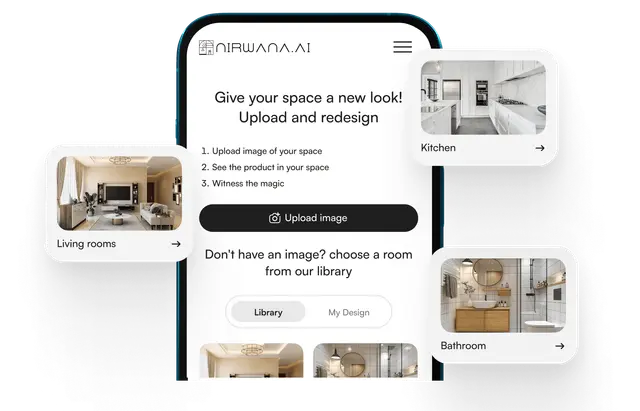
A digital tile visualization tool places tiles directly into a simulated space.
Designers can:
- Test multiple tile styles instantly
- View layouts in realistic room settings
- Adjust patterns, grout colors, and orientations
This transforms tile selection from guesswork into a confident design decision.
Tile Visualizer in Early-Stage Planning
Early planning sets the tone for the entire project.
Using visualization tools at this stage allows professionals to:
- Explore creative directions without commitment
- Compare alternatives side by side
- Finalize surface decisions before construction begins
This proactive approach saves time and resources later.
Improving Client Communication and Confidence
Clients often struggle to interpret technical drawings.
Visualization helps by:
- Making designs accessible to non-professionals
- Reducing misunderstandings
- Building trust through transparency
When clients can see the result clearly, approvals come faster and with greater confidence.
Tile Visualizer for Space-Specific Design Decisions
Every space has unique functional and aesthetic needs.
Residential Projects
Designers can test warm textures for living areas, slip-resistant tiles for bathrooms, and durable finishes for kitchens.
Commercial and Hospitality Spaces
Large-format tiles, traffic flow patterns, and brand-aligned aesthetics can be visualized accurately before installation.
Visualization ensures design choices match real-world usage.
Reducing Costly Errors Through Visualization
Mistakes in tile selection can be expensive.
Visualization helps avoid:
- Ordering incorrect quantities
- Choosing unsuitable finishes
- Misaligned patterns during installation
By identifying issues early, professionals reduce rework and material waste.
Tile Visualizer as a Creative Experimentation Tool
Design thrives on exploration.
With digital tools, architects and designers can:
- Try bold patterns without risk
- Experiment with unconventional layouts
- Push creative boundaries confidently
What once required physical mock-ups now happens instantly on screen.
Enhancing Collaboration Between Teams
Design projects involve multiple stakeholders.
Visualization supports collaboration by:
- Providing a shared visual reference
- Aligning architects, designers, and contractors
- Minimizing interpretation errors
Clear visuals lead to smoother execution on-site.
Tile Visualizer in Sustainable Design Planning
Sustainability starts with smart choices.
Visualization tools support eco-conscious design by:
- Reducing physical sample waste
- Helping choose durable, long-lasting tiles
- Optimizing layouts to minimize cutting waste
Digital planning aligns well with sustainable design goals.
Speed and Efficiency in Decision-Making
Time is critical in professional projects.
Visualization tools:
- Shorten design approval cycles
- Reduce back-and-forth discussions
- Enable faster project progression
Efficiency doesn’t compromise creativity—it enhances it.
Adapting to Client Preferences Quickly
Clients often change their minds—and that’s okay.
With visualization:
- Alternatives can be shown instantly
- Adjustments feel collaborative, not frustrating
- Decisions feel informed, not rushed
Flexibility becomes a strength rather than a challenge.
The Role of Realistic Rendering in Design Trust
Realistic visuals create credibility.
When designs look close to real-life:
- Clients trust recommendations more
- Expectations stay realistic
- Final results align better with initial vision
Accuracy builds long-term professional relationships.
Tile Visualizer for Renovation and Retrofit Projects
Renovations bring additional complexity.
Visualization helps:
- Integrate new tiles with existing elements
- Respect architectural constraints
- Preview outcomes without demolition
This is especially valuable in heritage or occupied spaces.
Training and Skill Development for Designers
Visualization tools are also learning aids.
They help professionals:
- Understand how tiles interact with space
- Develop a stronger sense of proportion
- Improve material selection skills
Over time, this sharpens design intuition.
Common Misconceptions About Tile Visualization Tools
Some believe these tools limit creativity or replace expertise.
In reality:
- They support, not replace, professional judgment
- They enhance creativity through clarity
- They empower better-informed decisions
Tools don’t design—designers do.
FAQs About Tile Visualization in Design
Are tile visualizers only for large projects?
No. They are equally useful for small residential spaces and large commercial projects.
Do visualization tools slow down the design process?
On the contrary, they usually speed it up by reducing revisions.
Can visualizers replace physical samples?
They complement samples but don’t fully replace tactile evaluation.
The Future of Design Planning
As technology evolves, visualization will become even more immersive.
Future trends include:
- AI-driven material suggestions
- Enhanced realism through advanced rendering
- Deeper integration with BIM and design software
Visualization is becoming a standard, not a luxury.
Final Thoughts on Better Planning Through Visualization
Design excellence lies in clarity, confidence, and collaboration. By integrating digital tools into their workflow, professionals can plan smarter, communicate better, and deliver results that truly match expectations. When used thoughtfully, a Tile visualizer becomes more than a tool—it becomes a design ally that bridges imagination and reality, ensuring every surface choice feels right long before installation begins.
About the Author