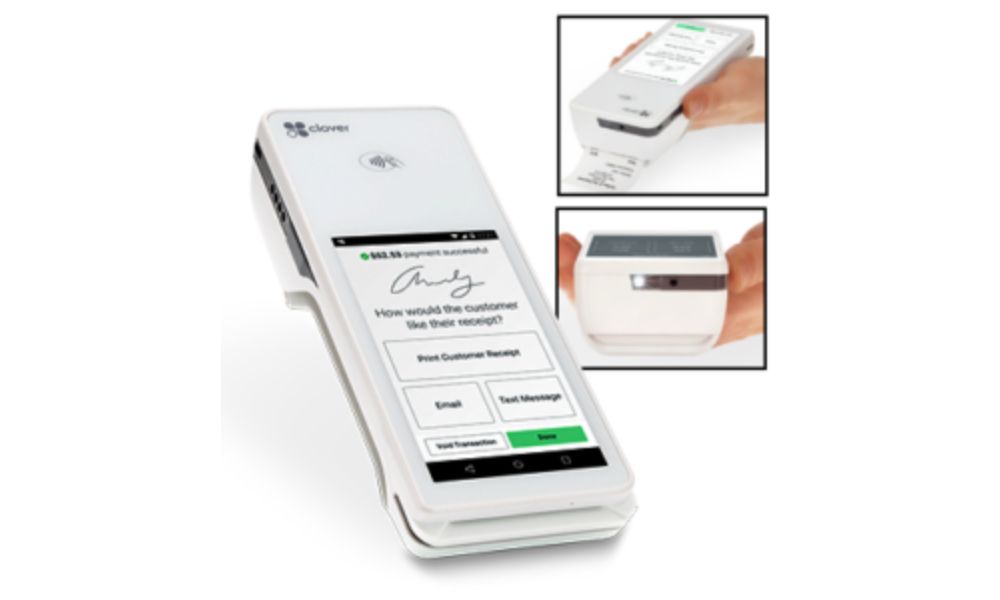
In 2026, businesses that rely on flexible and mobile point-of-sale (POS) systems are increasingly turning to Clover Flex. This system combines the traditional functionality of a POS with the convenience of portability, providing businesses with the flexibility to serve customers from virtually anywhere. It is especially useful for industries like retail, food services, and healthcare, where mobility and efficiency are key.
The Clover Flex POS system is a compact, all-in-one device that lets business owners and employees process payments, manage inventory, and complete orders from the palm of their hand. With its sleek design and robust features, this mobile POS system is ideal for businesses that need to serve customers on the go, such as restaurants, food trucks, salons, and pop-up shops. In this review, we will explore the key features of Clover Flex, its pricing, the advantages, and the potential downsides so that you can make an informed decision.
What is Clover Flex POS?
Clover Flex is part of the Clover POS ecosystem, which includes a variety of devices designed to help businesses accept payments and manage operations. What sets the Flex apart is its portability. Unlike traditional POS systems, which require a stationary setup, Clover Flex allows staff to take orders and process payments from anywhere on the premises.
This mobility is a huge benefit for businesses that need to reduce wait times or serve customers outside of a traditional checkout counter. Whether you’re working in a crowded retail store, delivering services on-site, or operating a mobile business, Clover Flex is designed to make transactions faster and more convenient.
Key Features of Clover Flex POS
Clover Flex is packed with a variety of features to help businesses run efficiently. Let’s break down some of the standout functions:
Comprehensive Payment Options
One of the most important features of Clover Flex is its ability to accept a wide range of payments. The system supports chip and pin credit and debit cards, magnetic stripe cards, and contactless payments such as Apple Pay and Google Wallet. This flexibility ensures that customers can pay using the method they prefer, which can lead to a smoother, quicker checkout experience.
Intuitive Touchscreen Interface
The device is equipped with a large touchscreen that makes it easy to navigate between menus, enter items, apply discounts, and process orders. The interface is designed to be user-friendly, meaning employees don’t need extensive training to get started. The touchscreen functionality also helps make customer interactions more streamlined.
Built-In Printer for Receipts
For businesses that need to provide physical receipts, Clover Flex comes with a built-in thermal printer. This eliminates the need for additional hardware, saving both space and cost. Whether it’s a receipt for a purchase or an order confirmation, Clover Flex can print it quickly and efficiently.
Inventory Management
Clover Flex helps businesses manage inventory by tracking stock levels and alerting users when items are running low. This feature is especially beneficial for retail businesses that need to stay on top of their product stock. By integrating inventory management directly into the POS system, businesses can avoid over-ordering or running out of products unexpectedly.
Real-Time Reporting and Analytics
With Clover Flex, business owners can access real-time reports on sales, employee performance, and customer preferences. This allows businesses to make data-driven decisions without the need for separate reporting systems. Whether you need to check daily sales or track the success of a promotion, these insights are available at your fingertips.
Pricing of Clover Flex POS
The pricing of Clover Flex can vary depending on your business needs and the features you want to include. However, it typically involves both the upfront cost for the device and ongoing fees for the software and payment processing.
Device Cost
The initial cost of the Clover Flex POS system is approximately ₹64,960 to ₹82,729, depending on the version you choose. This price covers the hardware itself, which includes the card reader, touchscreen, printer, and necessary accessories. It’s important to note that this cost is a one-time expense, although the system may require additional accessories if needed, such as a docking station or external hardware for specific tasks.
Subscription Plans
Beyond the hardware cost, Clover Flex operates on a subscription model. Monthly fees can range from ₹1,000 to ₹5,000, depending on the plan and features you require. These plans typically include access to the software and tools needed to manage payments, inventory, and reporting. More advanced features, such as employee scheduling or marketing integrations, may come with higher-tier plans.
Transaction Fees
When using Clover Flex, businesses will also need to account for transaction fees. These fees are typically around 2.3% to 2.6% plus ₹7–₹10 per transaction for in-person payments. For online or manually keyed-in transactions, the rate may be higher, generally around 3.5% plus ₹7 per transaction. These rates are competitive compared to other POS systems in the market.
Pros of Clover Flex
Clover Flex has many advantages, especially for businesses that prioritize mobility, simplicity, and integration. Here are the key benefits:
Portability and Flexibility
Clover Flex’s compact, handheld design allows businesses to operate on the go. This is especially useful for businesses that have a mobile workforce, such as food trucks, outdoor events, and pop-up shops. With the ability to process payments and manage operations from anywhere, Clover Flex helps improve service speed and customer satisfaction.
All-in-One Functionality
The Clover Flex combines multiple features into one device. You don’t need separate systems for payments, receipt printing, and inventory management — it all comes together in one integrated unit. This saves space and simplifies operations for businesses.
Easy-to-Use Interface
With its large touchscreen and intuitive interface, Clover Flex is easy to navigate, even for employees with minimal training. The simple, clean design reduces the learning curve and improves efficiency at the point of sale.
Real-Time Data and Reporting
Business owners can access real-time sales data and insights directly through the Clover Flex system. This helps with decision-making and provides a clear picture of the business’s performance. Whether you’re tracking sales trends or evaluating employee productivity, the system delivers the data you need quickly and easily.
Cons of Clover Flex
While Clover Flex offers many benefits, there are also a few drawbacks to consider. Here are some potential downsides:
Higher Upfront Cost
Compared to other mobile POS options, Clover Flex can be relatively expensive for small businesses. The initial investment in the hardware may be too high for businesses with limited budgets, particularly when you factor in ongoing subscription fees and transaction costs.
Ongoing Subscription and Transaction Fees
Although the upfront cost may be reasonable, the monthly subscription fees and transaction fees can add up over time. These costs can be especially high for businesses with a large number of transactions or those that rely heavily on credit card payments.
Some Features Require Additional Apps
Clover Flex works best when integrated with the broader Clover ecosystem. However, some advanced features require additional apps or integrations, which may come with additional costs. This can add complexity and increase the overall cost of the system.
Limited Customization for Some Businesses
Although Clover Flex offers a lot of built-in functionality, it may not be as customizable as other POS systems. Businesses with specific needs may find it difficult to tailor the system exactly to their requirements.
Is Clover Flex Right for Your Business?
Clover Flex is an excellent choice for businesses that require mobility and efficiency. Whether you are running a food truck, a retail store, or a service-based business, Clover Flex’s portability and ease of use make it an attractive option. It is especially beneficial for businesses that already use Clover hardware and software and want a seamless experience across multiple devices.
However, if your business is on a tight budget, you may want to explore other POS systems that offer lower upfront costs and more flexible pricing. For those with larger operations or complex needs, Clover Flex may offer the scalability and features required, but it’s important to weigh the costs and assess whether you need all the advanced features it offers.
To learn more about Clover Flex POS, you can explore detailed information on its features and benefits.
Conclusion
Clover Flex is a powerful and flexible POS system that provides businesses with everything they need to manage payments, orders, and inventory on the go. While the cost may be higher than some other systems, its mobility, ease of use, and robust feature set make it a strong contender for businesses that prioritize flexibility. By considering the pros and cons and evaluating the pricing, businesses can make an informed decision about whether Clover Flex is the right fit for their needs.
