



When work takes place beyond the four walls of an office or warehouse, printing flexibility becomes a game-changer. From maintenance crews and delivery services to retail associates and event organizers, portable label makers are revolutionizing how businesses stay organized, accurate, and efficient on the move.
Compact, durable, and easy to connect, today’s portable label makers online give field professionals the same labeling precision once limited to desktop printers. Whether you’re printing barcode tags, receipts, or maintenance labels, portable systems let you create high-quality output anywhere — no cables, no delay, and no guesswork.
The Shift Toward Mobile Printing
In today’s fast-paced industries, downtime equals lost revenue. Workers in logistics, healthcare, and retail need tools that keep up with their mobility. Traditional label printers — while powerful — are tied to desks or stations. Portable label makers break that barrier, allowing real-time labeling wherever the work happens.
Imagine a technician labeling cables during installation, a delivery driver printing return receipts from the vehicle, or a warehouse worker tagging items on a rolling cart. These scenarios once required walking back and forth to a printer station. Now, they’re handled instantly at the point of activity.
That immediacy not only saves time but also improves data accuracy and workflow visibility — essential for businesses that rely on precise asset and inventory management.
What Makes a Portable Label Maker Different?
Unlike traditional thermal or inkjet label printers, portable label makers are built around mobility and resilience. Here’s what defines them:
- Compact Design: Small enough to wear on a belt or fit into a bag.
- Wireless Connectivity: Bluetooth and Wi-Fi enable direct pairing with tablets, phones, or mobile apps.
- Battery-Powered Operation: Lithium-ion batteries provide hours of uptime without tethering.
- Rugged Construction: Many models are impact-resistant and dust-sealed for field or industrial environments.
With these features, portable printers empower teams to generate professional, scannable labels on the spot — reducing human error, preventing mix-ups, and eliminating lag between identification and documentation.
Key Use Cases Across Industries
Portable label makers can streamline labeling for nearly every mobile or semi-mobile task. Below are just a few high-value scenarios where these devices shine.
Field Services and Maintenance
Technicians in utilities, HVAC, or telecommunications often travel between job sites. Having a portable label printer allows them to print asset tags, service records, or cable identifiers instantly, ensuring all equipment remains properly labeled before leaving the site.
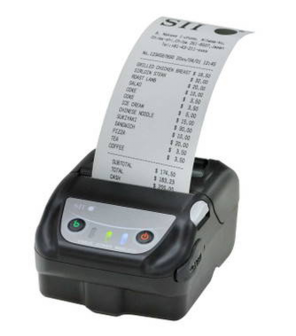
The Seiko MP-21L 2-Inch Wireless Mobile Label Printer Kit is a compact yet robust option for field engineers and contractors who need lightweight reliability. It connects via Bluetooth and supports a wide range of label materials, making it suitable for everything from part marking to safety labeling.
Retail and Inventory Management
On busy retail floors, employees can use mobile printers to print shelf tags, markdown labels, or restocking barcodes directly from handheld devices. This eliminates the bottleneck of stationary labeling stations and keeps shelves updated in real time.
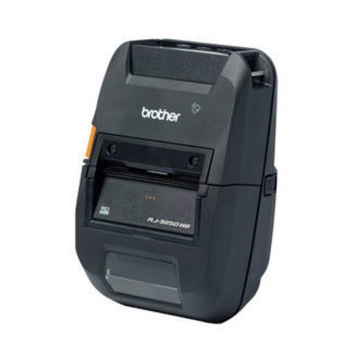
Devices like the Brother RJ-3250WBL-CP RuggedJet 3-Inch Mobile Label & Receipt Printer combine durability with fast wireless printing, ideal for retail teams managing price adjustments, product audits, or temporary promotions.
Logistics and Delivery Operations
In logistics, mobile printing accelerates labeling for deliveries, returns, and pickup confirmations. Drivers can print receipts or parcel labels directly from their trucks, ensuring traceability and eliminating manual note-taking.
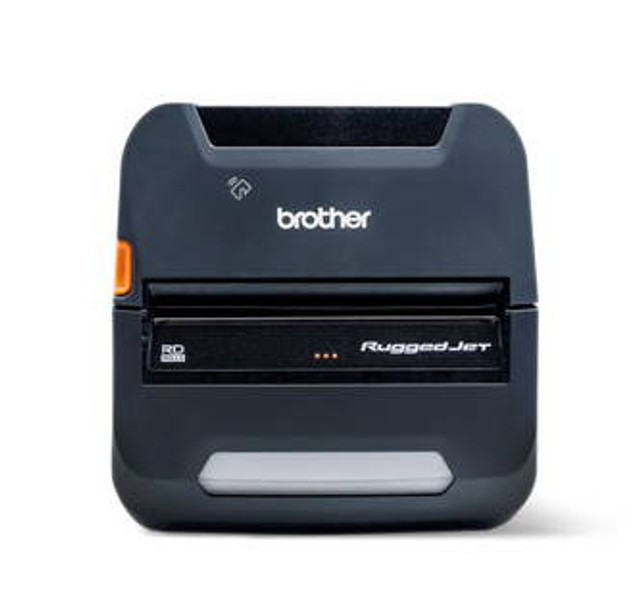
The Brother RJ-4250WBL-CP RuggedJet 4-Inch Mobile Printer offers 4-inch printing for full shipping labels and receipts, featuring a powerful battery system and a rugged housing built for daily transport and outdoor use.
Healthcare and Laboratories
Medical staff often require instant label printing for specimen identification, wristbands, or medication tracking. Portable printers simplify compliance and reduce the risk of patient or sample misidentification by printing at the point of care.
Events and Facilities Management
From concerts to conferences, event staff rely on quick identification badges, passes, or signage. Portable label makers make it easy to issue replacements, customize access levels, or update credentials on-site.
Advantages of On-the-Go Label Printing
Beyond convenience, mobile label printing delivers tangible operational benefits:
1. Time Savings and Workflow Efficiency
Eliminating the need to return to a fixed station significantly reduces downtime. Workers can label and move on immediately, keeping productivity uninterrupted.
2. Error Reduction
By printing labels where data originates — whether scanning inventory or documenting maintenance — workers avoid transcription errors and lost notes.
3. Real-Time Data Accuracy
When integrated with mobile apps or cloud systems, portable printers ensure every printed label corresponds to live data, creating instant traceability.
4. Flexibility Across Departments
One printer can serve multiple functions: asset tagging in maintenance, barcode labeling in retail, or documentation in logistics.
5. Professional Image and Compliance
In regulated industries, printed labels demonstrate professionalism and adherence to compliance standards — no hand-written tags or improvised stickers.
Selecting the Right Portable Label Maker
With many options available, focus on the following criteria before purchasing:
Print Width & Resolution
For general labeling, 2-inch models like the Seiko MP-21L work perfectly. For shipping or compliance labels, opt for 3- or 4-inch models like the Brother RJ-3250WBL or RJ-4250WBL, which provide larger print areas and clearer barcode readability.
Connectivity
Ensure the printer supports Bluetooth or Wi-Fi pairing with your existing devices. Compatibility with Android, iOS, or Windows is essential for field use.
Durability & Battery Life
Check IP ratings for dust or water resistance and runtime per charge. Industrial-grade models often include quick-swap batteries for uninterrupted shifts.
Software Compatibility
Portable printers should integrate easily with labeling software or apps. Many modern systems also support remote management for firmware updates and usage tracking.
Cost of Ownership
While portable models cost slightly more upfront, the productivity gains quickly offset the investment. Consumable costs, such as label rolls or batteries, are minimal compared to the efficiency benefits.
Integrating Portable Printing into Business Systems
To make the most of portable printers, integration should be deliberate — not an afterthought. Here’s how to ensure smooth adoption:
- Connect to a Central Database: Link portable devices to your main label management system so every print job uses the latest data.
- Standardize Label Templates: Maintain consistent designs across portable and desktop printing for brand alignment.
- Automate Print Triggers: Pair scanners or mobile apps to automatically prompt label generation when items are scanned or status updates occur.
- Train Staff Thoroughly: Employees should know how to pair devices, replace media, and troubleshoot common issues.
- Monitor Usage: Track printing activity to identify bottlenecks or opportunities for further automation.
This approach turns portable labeling into a cohesive extension of your broader business workflow.
Comparing Mobile Printers by Application
| Industry | Recommended Model | Key Benefit |
| Field Service & Maintenance | Seiko MP-21L | Lightweight and easy to carry for labeling equipment or cables. |
| Retail & Inventory | Brother RJ-3250WBL | Fast wireless label printing for real-time shelf updates and stock checks. |
| Logistics & Delivery | Brother RJ-4250WBL | Prints full-sized 4” labels for receipts, parcels, or compliance documentation. |
| Healthcare | Seiko MP-21L or RJ-3250WBL | On-demand labeling at patient bedside or in labs. |
| Events & Facilities | RJ-3250WBL | Quick, mobile badge and pass printing at any venue. |
This flexibility demonstrates how portable label makers empower teams to label accurately anywhere, anytime.
Maintenance and Best Practices
To extend your device’s lifespan and ensure optimal print quality:
- Store printers in protective cases when traveling between job sites.
- Use genuine label media for best adhesion and legibility.
- Charge batteries fully before each shift to prevent power loss mid-task.
- Regularly clean the printhead with approved wipes to prevent buildup.
- Keep firmware updated for the latest compatibility and security improvements.
These small practices ensure consistent, professional results even under demanding conditions.
The Future of Portable Labeling
As connectivity and miniaturization improve, portable label makers are becoming more intelligent. Expect to see integration with IoT systems, mobile analytics, and cloud-based label libraries that allow teams to pull templates instantly.
For businesses embracing mobility, portable printers will serve as a cornerstone of modern workflow design — connecting data, devices, and documentation in real time.
Forward-thinking companies are already combining portable printers with affordable barcode scanners online to create truly connected field systems capable of tracking assets, printing, and scanning in one motion.
Mobility Meets Productivity
Portable label makers are no longer niche tools — they’re essential for modern businesses that thrive on efficiency and flexibility. By bringing labeling directly to the point of action, they empower teams to stay organized, reduce errors, and improve response times.
From the Seiko MP-21L to the rugged Brother RJ-3250WBL and RJ-4250WBL, each portable printer offers dependable performance tailored to specific on-the-go tasks. When combined with your existing workflows, they can dramatically enhance how and where your teams label, document, and deliver value.
To explore the latest portable label makers online and find the best fit for your industry, visit DuraFast Label’s solutions page. For personalized guidance or integration support, contact them to speak with an expert who can guide you toward the perfect setup.
About the Author
James Holloway is a freelance technology journalist specializing in logistics, mobile hardware, and industrial innovation. He writes about how portable tools and connected devices help businesses become faster, smarter, and more responsive in the field.
About the Author