Choosing the right replacement blade shapes the quality of your work more than many users expect. When someone works on decals, small lettering or reflective signage, the tool they rely on needs to match their cutting style and material choice. That is where Mimaki plotter blades play a valuable role because each blade angle supports a specific purpose. A well selected blade helps maintain clean edges, smooth curves and well defined corners without excessive adjustments.
Since different Mimaki models support various cutting strengths and material ranges, users benefit from understanding how each blade behaves. The blade selection influences accuracy, longevity and overall workflow speed. A little attention during the selection process helps reduce wasted material and creates more predictable outcomes.
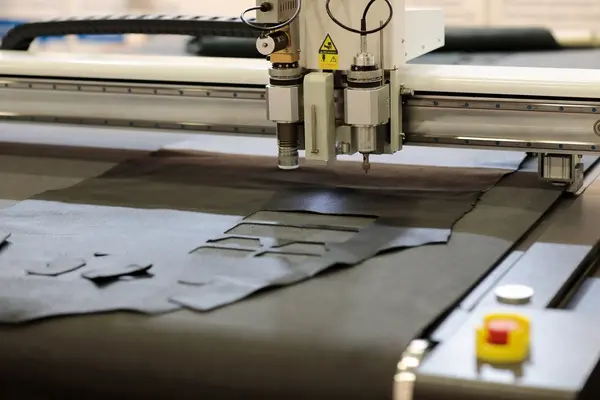
Why Blade Angle Matters
Blade angle influences the depth and shape of the cut. On a Mimaki cutter, angles do more than change sharpness. They guide the blade through each movement and determine how much pressure the blade requires. Those who work with Mimaki plotter blades know that selecting the wrong angle might create rough edges or incomplete lines.
A 30° blade behaves differently from a 50° blade, so material choice becomes an important factor. Smaller angles generally support thinner materials because they glide along the surface without digging too deep. Sharper angles serve detailed work where tighter turns and fine characters demand more control. When users match angle to material, they reduce strain on the blade and improve the finish of each project.
The Purpose of the 001 Standard 37° Blade
The standard 37° blade suits most day to day vinyl cutting needs. It works well with adhesive vinyl and handles general shapes with dependable accuracy. When users want straightforward cuts without demanding corners or tiny arcs, this blade keeps the workflow smooth. Those who rely on Mimaki plotter blades often start with this angle because it strikes a balanced middle ground.
This blade angle is capable of handling longer projects as long as users manage pressure settings properly. Since it stays sharp for a reasonable time, it supports consistent results across multiple sheets. It represents a practical starting point for most users who want dependable performance without complicated adjustments.
When to Choose the 030 Combo 50° Blade
The 50° blade offers a sharper angle suited for detailed outlines. Users who cut smaller characters, logos or intricate shapes appreciate the control this angle provides. It allows crisp edges that vinyl responds to well. When someone works with tiny text or delicate features, the blade follows each turn without lifting the material.
Since professionals often switch to sharper blades when they want precise detail work, the 030 combo blade holds importance in any well rounded toolkit. Those who rely frequently on Mimaki plotter blades value how this angle supports high accuracy without unnecessary drag. Its ability to glide through small paths makes it a dependable choice for designing heavy projects.
Understanding the 003 Small Character 50° Blade
Smaller characters demand sharper control. The 003 small character blade offers the same angle as the 030 combo but with a design focused specifically on micro detail. This blade supports users who produce tiny labels or highly detailed cuts that leave no margin for error. Small lettering tends to show imperfections quickly, so a blade built for delicate paths helps maintain clarity.
This blade choice suits users who frequently handle intricate work. Since those who depend on Mimaki plotter blades might shift between standard shapes and fine detail work, having this blade nearby encourages flexibility. When users adjust pressure correctly, this blade maintains accuracy even in demanding designs.
Why Some Users Prefer the 56° Blade
The 56° blade supports vinyl and reflective materials that require deeper or more controlled penetration. When designs include bold outlines or intricate, layered effects, the 56° angle offers an advantage. Its sharper geometry supports clean separation of layers, especially when reflective materials create more resistance.
Users who often cut reflective sheets understand how sensitive they are to blade performance. A sharper blade angle keeps the motion smooth and reduces the risk of tearing. When someone works regularly with these materials, the presence of Mimaki plotter blades with higher angles helps maintain predictable results.
How Pressure Settings Influence Blade Choice
Correct pressure settings help users get the most from their blades. Mimaki cutters respond to light adjustments, and understanding this relationship helps extend blade life. When the blade angle matches the material, users only require minimal pressure. Those who rely on Mimaki plotter blades often adjust downforce to avoid reaching the backing layer because that usually lowers blade longevity.
Reducing downforce keeps edges clean and avoids unnecessary drag. When users start with lower pressure and increase gradually, they develop a feel for how each blade responds. This practice also lowers the chances of cutting through adhesive layers accidentally.
Pairing Blade Type With Material Thickness
Matching material thickness with blade type supports both performance and efficiency. Vinyl usually pairs well with 30° and 37° blades because the material stays stable under light pressure. Reflective film works smoothly with 50° and 56° blades since its layered structure responds better to sharper angles. Cardstock behaves predictably with mid range angles when users keep the pressure moderate.
Users who choose Mimaki plotter blades carefully enjoy cleaner edges and better finishing. When someone experiments with unsuitable angles, they might see frayed lines, tearing or misaligned cuts. Material pairing builds a dependable foundation for well produced designs.
Signs You Are Using the Wrong Blade
Several signs indicate a blade mismatch. If the cutter struggles to follow curves or leaves ragged edges, the angle might not suit the material. Lifting around corners suggests the blade angle remains too shallow, while inconsistent depths often point to a worn edge. Users who rely daily on Mimaki plotter blades pay attention to these details because they understand how small issues affect output quality.
When a blade feels inconsistent, replacing it or switching angles usually solves the problem quickly. It helps avoid wastage and keeps projects on schedule.
Conclusion
Selecting the right blade for your Mimaki cutter shapes the accuracy and smoothness of every project. Those who work with Mimaki plotter blades appreciate how each angle supports a specific purpose and helps deliver cleaner lines, sharper text and more reliable results. Understanding blade behavior encourages users to pair materials and angles more thoughtfully, which supports higher quality outcomes.
As users refine their cutting preferences, they often explore advanced options to enhance detail work and maintain consistent sharpness. That exploration may include products such as custom Plotter blades because they offer unique angles and specialized structures suited for particular design needs. Since durability and precision influence output quality, choosing custom Plotter blades helps users match their tools with their creative goals. This careful selection process guides them toward smoother workflows and more polished finishing.
Customer Engagement and Loyalty Software for Modern Brands
Customer Engagement and Loyalty Programs: Building Lasting Value
Customer Engagement Loyalty Programs for Lasting Brand Value
How to Identify Pocket Door Damage Before It Gets Worse
How Crypto Exchange Platforms Integrate API Systems for Trading Connectivity
