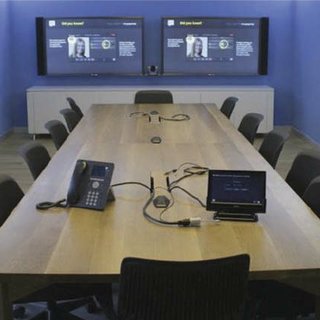
Video Conferencing System Setup: Building Reliable Communication for Modern Businesses
The way businesses communicate has changed dramatically over the past few years. With remote work, hybrid teams, and global clients becoming the norm, organizations now depend on seamless digital communication to stay productive and competitive. A professional video conferencing system setup plays a crucial role in making that communication effective, reliable, and frustration-free.
While platforms like Zoom, Microsoft Teams, and Google Meet power virtual meetings, the real experience depends on how well your system is designed, installed, and optimized. A poorly configured setup can lead to echoing audio, frozen screens, dropped calls, and wasted meeting time. On the other hand, a professionally designed video conferencing system creates clarity, confidence, and collaboration.
Why Video Conferencing System Setup Matters More Than Ever
Many companies underestimate the importance of proper setup and rely on basic plug-and-play solutions. While these may work for casual calls, they often fall short in professional environments.
A proper video conferencing system setup ensures:
- Clear audio and sharp video
- Easy meeting startup with minimal user effort
- Stable connectivity without interruptions
- A professional experience for employees and clients
- Long-term scalability as business needs grow
Without a structured setup, meetings become stressful, productivity drops, and communication suffers.
Key Benefits of a Professional Video Conferencing System Setup
1. Consistent Audio and Video Quality
Clear communication starts with quality. Professional setups ensure microphones, speakers, cameras, and displays are carefully selected and positioned for the room size and layout. This eliminates common issues such as echo, background noise, or poor visibility.
Participants can hear and see each other clearly, making conversations feel natural and engaging.
2. Simplified User Experience
One of the biggest frustrations in meetings is dealing with complicated technology. A professional setup focuses on usability, offering:
- One-touch meeting start
- Simple control panels or tablets
- Seamless switching between presentations and video calls
- Easy integration with calendars and scheduling tools
This allows anyone to run a meeting confidently, without relying on IT support.
3. Increased Productivity and Engagement
When technology works smoothly, meetings stay focused and productive. Employees spend less time troubleshooting and more time collaborating, sharing ideas, and making decisions. A reliable system setup supports better engagement from both in-room and remote participants.
4. Professional Image and Client Trust
Your video conferencing setup reflects your brand. Poor audio or video can appear unprofessional, while a clean, well-designed system builds credibility and trust. Clients and partners are more confident when meetings feel polished and seamless.
5. Scalable and Future-Ready Solutions
A well-planned video conferencing system is designed with growth in mind. Whether adding new meeting rooms, supporting hybrid work, or upgrading technology, professional setups make future expansion easier and more cost-effective.
Core Components of a Video Conferencing System Setup
1. Cameras and Visual Displays
Video clarity is essential for effective communication. A professional setup includes:
- HD or 4K cameras for sharp visuals
- Pan-Tilt-Zoom (PTZ) cameras for larger rooms
- Wide-angle lenses to capture all participants
- Large displays or projectors for clear viewing
Proper camera placement ensures natural eye contact and balanced framing for all participants.
2. Audio Systems and Microphones
Audio problems are the most common cause of meeting frustration. A professional setup includes:
- Ceiling, table, or boundary microphones
- High-quality speakers for even sound distribution
- Acoustic treatment to reduce echo and noise
- Audio calibration for consistent volume levels
Clear audio ensures every voice is heard without strain or repetition.
3. Lighting and Room Layout
Lighting directly affects video quality. Professional setups optimize:
- Ambient lighting to eliminate shadows
- Presenter lighting for clear visibility
- Camera angles that avoid glare
- Room layouts that support natural interaction
Balanced lighting enhances both on-screen appearance and participant comfort.
4. Network and Connectivity Optimization
A stable network is critical for uninterrupted meetings. Professional video conferencing system setup includes:
- Sufficient bandwidth allocation
- Optimized wired and wireless connections
- Secure network configurations
- Redundancy planning to prevent downtime
This ensures smooth video, clear audio, and consistent performance during every meeting.
5. Cable Management and Equipment Organization
Messy cables and cluttered equipment can create safety hazards and maintenance challenges. Professional services include:
- Concealed cable routing
- Structured wiring for easy upgrades
- Rack-mounted AV equipment
- Clean, organized installations
A tidy setup improves reliability and gives the room a professional appearance.
6. Control Systems and Automation
Modern video conferencing systems often include smart controls such as:
- Touch panels or tablets
- One-button meeting start and end
- Automated lighting and display adjustments
- Calendar and room scheduling integration
Automation simplifies daily use and ensures consistency across meetings.
Spaces That Benefit from Video Conferencing System Setup
Executive Boardrooms
Large boardrooms require advanced camera coverage, multiple microphones, and large displays for high-level discussions and presentations.
Huddle Rooms
Small collaboration spaces benefit from compact, all-in-one systems that deliver professional quality without complexity.
Training and Collaboration Rooms
These spaces require interactive displays, clear audio, and seamless content sharing for both in-person and remote participants.
Hybrid Meeting Rooms
Hybrid setups ensure remote employees feel equally included, supporting collaboration across locations.
Private Offices
Executives and managers benefit from dedicated setups for confidential, high-quality meetings.
The Video Conferencing System Setup Process
Step 1: Consultation and Assessment
Specialists assess room size, acoustics, lighting, network capacity, and business requirements to design a customized solution.
Step 2: System Design and Equipment Selection
Based on the assessment, appropriate cameras, microphones, displays, and control systems are selected to match the room’s purpose.
Step 3: Installation and Integration
Technicians install equipment, manage cables, and integrate the system with existing networks and conferencing platforms.
Step 4: Testing and Calibration
Audio, video, and connectivity are tested and fine-tuned to ensure optimal performance.
Step 5: User Training
Staff receive hands-on training and documentation, ensuring they can operate the system confidently.
Step 6: Ongoing Support
Professional services often include maintenance, updates, and technical support to keep systems running smoothly.
Common Problems Solved by Professional Setup
A professional video conferencing system setup eliminates:
- Echo and audio distortion
- Blurry or poorly framed video
- Complicated meeting startup
- Network instability
- Cable clutter and equipment issues
- User frustration and wasted time
With expert setup, meetings become consistent, efficient, and stress-free.
Conclusion
A well-planned video conferencing system setup is no longer a luxury—it’s a necessity for modern businesses. From crystal-clear audio and sharp video to intuitive controls and organized equipment, professional setup transforms meeting spaces into powerful collaboration hubs.
For organizations seeking expert design, installation, and long-term support, Video Conferencing NY delivers reliable video conferencing solutions tailored to business needs. Their expertise ensures every meeting room is optimized for seamless communication, professional collaboration, and long-term success.
UTV Shipping Cost and Choosing Reliable Services with Ship A1 Auto Transport
Why Most Crypto Tokens Fail And How Entrepreneurs Can Get It Right?
Embedded Software Market Demand Across Consumer Electronics And Automotive Sectors
4K Set Top Box Market Growth Driven By Smart Connectivity And OTT Integration
Cervical Pillows Market Growth Driven By Aging Population And Lifestyle Disorders
