Wall Panel Room Visualizer: See Your Walls Come to Life Before You Design
When it comes to designing a space, walls are often the most underestimated element. Yet, they have the power to completely transform how a room looks and feels. From modern fluted panels to luxurious textured finishes, wall panels can define the entire aesthetic of a space. But here’s the challenge — how do you know what will actually look good in your room before you install it?
This is where a wall panel room visualizer becomes a game changer.
Instead of relying on imagination, catalogs, or guesswork, you can now see exactly how different wall panels will look in your own space — instantly, accurately, and realistically.
What Is a Wall Panel Room Visualizer?
A wall panel room visualizer is a digital tool that allows you to upload an image of your room (or choose a preset space) and apply different wall panel designs to your walls in real time.
It gives you a realistic preview of:
- Colors and textures
- Panel patterns and layouts
- Lighting effects and shadows
- Overall aesthetic impact
Unlike traditional mockups, these tools are designed to replicate real-world conditions, helping you make confident design decisions.
Why Traditional Methods Don’t Work Anymore
Before visualizers became popular, choosing wall panels was a frustrating process:
1. Sample-Based Decisions
You’d look at small samples and try to imagine how they’d scale across your entire wall.
2. Catalog Confusion
Hundreds of designs, but no real context of how they fit your space.
3. Expensive Mistakes
Once installed, changing panels is costly and time-consuming.
A wall panel room visualizer eliminates all of these issues by giving you clarity upfront.
How a Wall Panel Room Visualizer Works
The process is surprisingly simple and user-friendly.
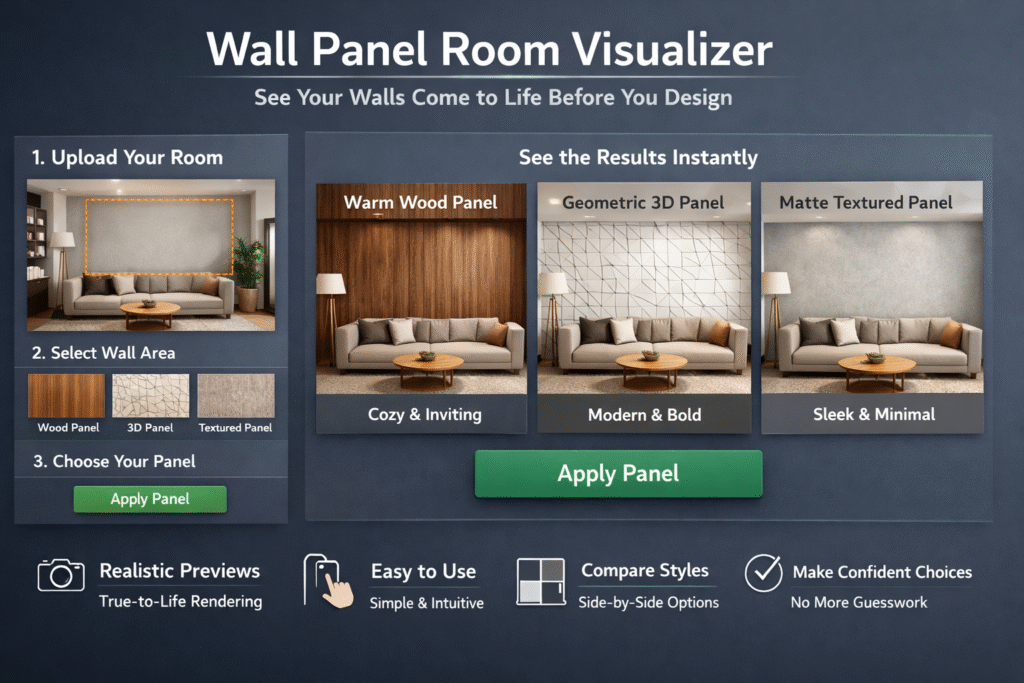
Step 1: Upload or Capture Your Room
Take a photo of your wall or use an existing image.
Step 2: Select the Wall Area
Mark the area where you want to apply the panel design.
Step 3: Choose Your Panel Design
Browse through different styles — wood, PVC, 3D panels, stone textures, and more.
Step 4: Visualize Instantly
The tool applies the panel in real time with accurate scaling, lighting, and perspective.
Within seconds, you can explore multiple design options without any physical effort.
Real-Life Example: Designing a Living Room Feature Wall
Imagine you’re redesigning your living room.
You’re confused between:
- A warm wooden panel finish
- A bold geometric 3D panel
- A subtle matte textured panel
Using a wall panel room visualizer, you can test all three options in your actual room image.
You might realize:
- The wooden panel makes the room feel cozy but slightly darker
- The 3D panel adds drama but feels too heavy
- The matte texture gives a clean, modern look
This clarity helps you choose confidently — without trial and error.
Key Benefits of Using a Wall Panel Room Visualizer
1. Better Decision Making
You’re no longer guessing — you’re seeing.
2. Saves Time and Cost
Avoid multiple site visits, sample orders, and rework.
3. Enhanced Customer Experience
For brands and retailers, this tool helps customers visualize before buying, increasing conversions.
4. Realistic Previews
Modern tools simulate lighting, shadows, and textures with high accuracy.
5. Unlimited Experimentation
Try multiple styles, colors, and layouts without any limitations.
Why Brands Are Adopting This Technology
Today’s customers expect more than just product listings — they want experiences.
A wall panel room visualizer allows brands to:
- Showcase their entire catalog interactively
- Increase customer engagement on their website
- Reduce decision friction
- Boost sales conversions
For example, platforms like Nirwana.ai are helping brands integrate visualization directly into their websites, enabling customers to explore products in their own spaces before purchasing.
Types of Wall Panels You Can Visualize
A good visualizer supports a wide range of panel categories:
Wood Panels
Perfect for warm, natural interiors.
3D Wall Panels
Adds depth and a modern architectural feel.
PVC Panels
Affordable, versatile, and easy to maintain.
Stone & Marble Panels
Ideal for luxury and high-end aesthetics.
Fabric & Upholstered Panels
Great for bedrooms and acoustic spaces.
With a wall panel room visualizer, you can switch between these styles instantly and compare them side by side.
Features to Look for in a Good Visualizer
Not all tools are built the same. If you’re choosing a wall panel room visualizer, look for:
Accurate Scaling
Panels should fit proportionally to your wall.
Realistic Rendering
Lighting, shadows, and textures should feel natural.
Easy-to-Use Interface
No technical skills required.
Mobile Compatibility
Users should be able to visualize directly from their phones.
Fast Processing
Instant results are key to a smooth experience.
Solutions like Nirwana.ai are focusing on delivering these features to create a seamless and realistic visualization experience.
How It Impacts Buying Behavior
The biggest advantage of a wall panel room visualizer is how it changes the way people buy.
Instead of asking:
“Will this look good?”
Customers start saying:
“This is exactly what I want.”
This shift reduces hesitation and increases buying confidence significantly.
In fact, businesses using visualization tools often see:
- Higher conversion rates
- Faster decision cycles
- Lower return rates
The Future of Interior Design Visualization
Visualization is no longer a luxury — it’s becoming the standard.
As technology evolves, we’ll see:
- AI-driven design suggestions
- Real-time AR (Augmented Reality) previews
- Personalized recommendations based on room style
A wall panel room visualizer is just the beginning of a more interactive and intelligent design journey.
Conclusion
Designing your walls shouldn’t feel like a gamble. With a wall panel room visualizer, you can explore ideas, test styles, and finalize your design with complete confidence.
Whether you’re a homeowner planning a renovation or a brand looking to enhance customer experience, this technology brings clarity, speed, and creativity into the process.
If you’re ready to make smarter design decisions and offer a better buying experience, tools like Nirwana.ai are helping bridge the gap between imagination and reality.
Start visualizing, experiment freely, and create spaces you truly love.
